Entries tagged 'software'
Poking around with Rust
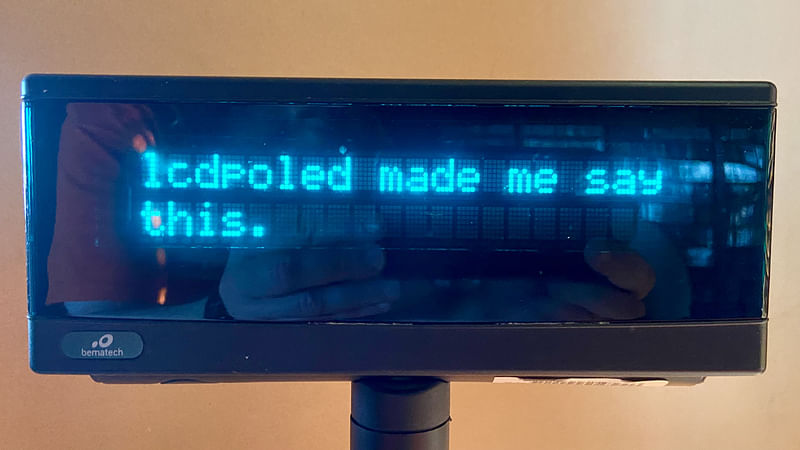
A long time ago, I implemented a quick-and-dirty daemon in C that used the vendor’s support library to display messages on an LCD pole display at the store. The state of California requires that electronic point-of-sale systems have a customer-facing display, and this fulfilled that.
It was very simple, it just listened for TCP connections and displayed the text it was sent. Every 15 seconds it would reset the display to a hardcoded default message. When an item was added to an invoice in Scat POS, it would push the name and price to the daemon. It also pushed the total when payment was initiated.
Like I said, it was quick and dirty, and we used it for a decade and I never really got around to doing any of the basic improvements that I wanted to do, like being smarter about when to go back to the default display.
The LCD display was one of the things we didn’t manage to sell off when we closed down the store, so I took it home and now it’s on my desk, hooked up to the Raspberry Pi 4 that used to be our print server. I decided to use it as an excuse to start learning Rust.
I pulled out one of the examples from the code for a crate that wraps libusb to provide access to USB devices, hit it with a hammer until I got it to push text to the display, and now I have the basis to re-implement what I had before and then give it the polish that I never did. Maybe implement a more user-friendly way of sending the various control codes from the user manual for doing things like clearing the screen.
That’s the theory, at least. The reality is that first I had to migrate all of my photos from Flickr to my own service, implement a way to add new photos to the collection, and then upload the photo I took of the display showing a simple message so I could blog about it.
And I am not sure if doing more with this is actually the next thing I’ll tackle, but writing about what I had done so far is at least something to check off the to-do list that I don’t have.
The code lives in the lcdpoled repository on GitHub. (The old C code is now off on a different branch.)
A bit of a rant on job searching
(I originally wrote this on LinkedIn, so consider this a bit of reverse-POSSE.)
I think one of the most frustrating things about being a software engineer searching for a job is the terrible job listing/search websites out there.
ZipRecruiter search is ridiculously awful. They seem to have thrown a bunch of AI at things so they can tell you a job is a “Good match” or “Poor match” or even “Not a match” and then you can’t even filter or sort on that. (And a problem that is probably more unique to my job search is how it likes to recommend healthcare worker jobs if you search for “PHP.”)
LinkedIn keeps track of jobs you applied for and somehow doesn’t let you remove them from that list. (And there was weeks when it kept showing me jobs managing chain restaurants like KFC in Nashville.)
Otta is actually probably my favorite even though sometimes it feels like every software engineer job there is for Python, Go, and/or React. (And it is quite focused on startups and big-tech.)
That's just the job listings, then you have to wade through a mess of job application portals and sites that will, if you’re lucky, ingest your work history from LinkedIn or a standard resume and not require you to re-enter your job history again with a lot of questionable custom UI elements.
The final step is the almost total lack of response you get to job applications. Even just a semi-automated “we will not be going forward with your application” is too much to expect, I guess. I know the number of applications can be overwhelming, but do the people applying a kindness and tell them no.
I just want a job making the people’s lives better through software. I hope I don’t go insane having to use terrible software in order to get one.
lcdpoled
it turns out that the county of los angeles regulates the use of point-of-sale systems that use barcode scanners. one requirement is that you have a customer-facing display that shows prices as they are scanned.
after investing in a lcd pole display (for about $175), i had to bang together a way for scat to feed data to the display. and thus was born lcdpoled, a very simple daemon that listens for stuff to display.
i need to do some more work to make it as seamless as i would really like, but i think i have done enough to get us through an inspection if and when they stop back in to do that.
siamang: a web-based command-line client for mysql
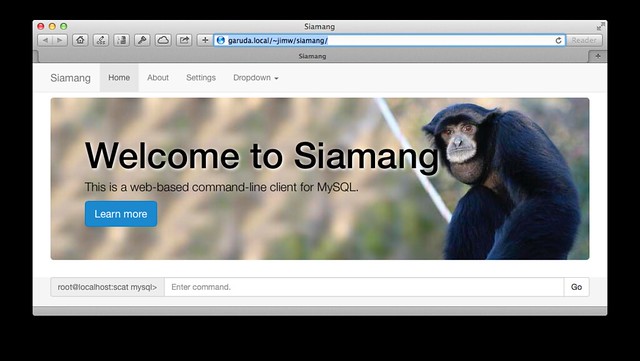
because i have many more important things to be doing, i procrastinated by whipping up a little web-based command-line client for mysql. what does that mean? you load the webpage, start typing in sql commands, and it presents the results to you. it is just a weekend hack at this point, and has a lot of rough edges. it does have some cool features, though, like a persistent command-line history using Web Storage.
probably the biggest limitation is because it not maintaining a persistent connection on the backend, you can’t use variables, temporary tables or transactions.
it was really born because i was getting frustrated running queries using the command-line client and having the ASCII table look all wonky because it was too big for my terminal screen. html makes that pretty much a non-issue. it is also tablet-friendly.
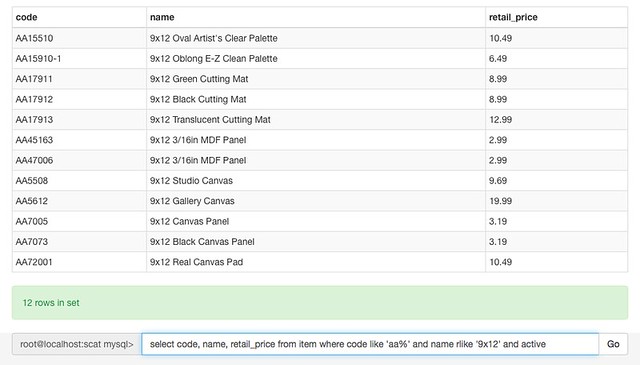
it was also an excuse to play with a few things i was interested in, like knockout. the whole thing is under 400 lines of code/html right now, but by leveraging bootstrap and knockout, it actually looks pretty polished and functional.
the name comes from a type of gibbon, which seemed to be unused in the software world.
you can find the source on github.
cranking along
a few weeks ago, i got it in my head that the ideal time to switch to using scat, the web-based point-of-sale system that i have allegedly been working on for almost 18 months, would be after the new year. this is despite the fact that it was barely even a rough prototype of some ideas. but i’ve been cranking along on it over the last couple of weeks, and it looks like i might just have something that we can use by my arbitrary deadline.
it’s still just barely a rough prototype of ideas, but i there should be enough there on the surface for us to be able to use it, and needing to fill in the gaps because we are actually using it will probably provide plenty of motivation to make it better.
even in the very rough state it is in, it should alleviate some of the pains of our current system. and save us the $30/month we were paying for not-very-helpful support and slow-to-arrive upgrades (trading that for my time to support the new system, of course).
banker’s round for mysql
for some reason, nobody has ever exposed the different rounding methods via mysql’s built-in ROUND() function, so if you want something different, you need to add it via a stored function. the function below is based on the T-SQL version here.
CREATE FUNCTION ROUND_TO_EVEN(val DECIMAL(32,16), places INT)
RETURNS DECIMAL(32,16)
BEGIN
  RETURN IF(ABS(val - TRUNCATE(val, places)) * POWER(10, places + 1) = 5
            AND NOT CONVERT(TRUNCATE(ABS(val) * POWER(10, places), 0),
                            UNSIGNED) % 2 = 1,
            TRUNCATE(val, places), ROUND(val, places));
END;
use at your own risk. there may be edge conditions where this fails. but this matches up with the python and postgres based system i was crunching data from, except in cases where that system gets it wrong for some reason.
one thing you might notice is that it does not use any string-handling functions like the other “correct” solution floating around out there.
building an order
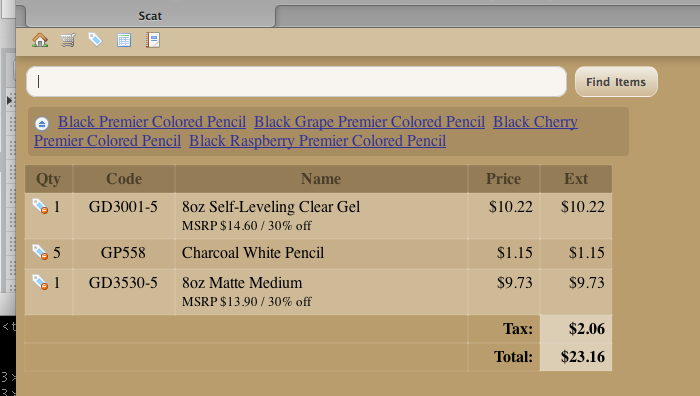
it feels like i’ve been thinking about this point-of-sale thing long enough that when i find time to sit down and write some code, the pieces actually fall together pretty quickly. today i was able to rough together an order-building interface with a few bells and whistles (literally: it has audible cues).
still a long way to go, but this should be a useful little toy to let us take advantage of a spare computer and barcode scanner to more easily price items from incoming shipments and get them out on the shelves.
one of the things that this screenshot shows is what happens when a scan or search matches multiple different items — it adds a (crudely presented) list of the possible matches, and clicking on any one of them adds that item to the order.
three kinds of people
progress on scat continues to be slow, because i have not found a lot of time to work on it. but every week i have to deal with processing our weekly in-take of products with our current point-of-sale system, i kick myself a little more and get motivated to spend a little more time on it.
the big addition today was a table for people, which is pretty straightforward. our current system divides people up into three types (and stores them in the same table as products, thanks to a normalization scheme i have not carried over into scat), and currently i don’t make any such distinction because sometimes customers can become employees and vendors can be customers and we have few enough of all three that keeping them distinct doesn’t seem worth the extra complexity.
scattered progress
scat is the name of the web-based point-of-sale system that i’ve been working on. you might have guessed this if you had been paying attention to the tags on my earlier posts. you can also find the source code for scat on github. there is not much to see, as i am still tinkering and throwing code together to test ideas out.
the progress so far is that i can load all of the item data over from our checkout data, and search those items. one of the most painful things for us right now is receiving orders, so i have cobbled together the start of that functionality to use. we will be able to receive the order using this as we unpack the order, and then go back to checkout and receive the order there all at once through its stock room interface.
(the reason that receiving orders through checkout is so painful for us is that using the stock room interface cripples the performance of checkout. and since we are just using checkout on a single computer, it makes it hard to receive orders while we also want to serve customers.)
this is starting to get fun.
stuff in, stuff out
i know that i said that inventory is next, but i’m not sure that it really is, or at least not in terms of thinking of having an inventory that we add items into and out of. maybe what we really have is a collection of transactions that in their aggregate can be used to describe the inventory.
as i see it, there are three types of transactions:
- vendor transactions: we put together a purchase order, we receive items (which may be more or less than what is on the purchase order and may not happen all at once), and we return items.
- customer transactions: customers order items, we “deliver” items, and customers return items.
- internal transactions: items are damaged, defective or stolen, and we take items for our own use.
so we’ll need a basic table for tracking these transactions (which i will abbreviate to txn because i am lazy):
CREATE TABLE `txn` (
  `id` int(10) unsigned NOT NULL AUTO_INCREMENT,
  `number` int(10) unsigned NOT NULL,
  `created` datetime NOT NULL,
  `type` enum('internal','vendor','customer') NOT NULL,
  PRIMARY KEY (`id`),
  UNIQUE KEY `type` (`type`,`number`)
)
i am not thrilled with the number field, but we need some sort of user-visible number for printing on invoices, receipts, etc. consider this a placeholder for a better idea.
and for each transaction, we will have lines of items involved:
CREATE TABLE `txn_line` (
  `id` int(10) unsigned NOT NULL AUTO_INCREMENT,
  `txn` int(10) unsigned NOT NULL,
  `line` int(10) unsigned NOT NULL,
  `item` int(10) unsigned DEFAULT NULL,
  `ordered` int(10) unsigned NOT NULL,
  `allocated` int(10) unsigned NOT NULL,
  PRIMARY KEY (`id`),
  KEY `txn` (`txn`,`line`),
  KEY `item` (`item`)
);
these tables are both very incomplete — no prices are being tracked here yet, among other things. but this is enough for me to start playing with loading in data and building interfaces to it.
more pieces of the puzzle
back to noodling around with the item table. i think i am going to try and be a bit less deliberative with all of this, since i clearly don’t have a lot of spare time to spend on this and need to build some momentum.
i won’t get into tracking inventory yet, but a basic quality of an item i want to track is a minimum quantity to have on hand. i guess in an ideal system, these minimum quantities would be dynamic and driven by actual sales data, but for now we’ll be hand-tuning this number for items.
an item gets called by its name, so we’ll need a field for that.
so here is our final rough draft of the item table:
CREATE TABLE `item` (
  `id` int(10) unsigned NOT NULL AUTO_INCREMENT,
  `code` varchar(255) NOT NULL,
  `name` varchar(255) NOT NULL,
  `brand` int(10) unsigned DEFAULT NULL,
  `retail_price` decimal(9,2) NOT NULL,
  `discount_type` enum('percentage','relative','fixed') DEFAULT NULL,
  `discount` decimal(9,2) DEFAULT NULL,
  `minimum_quantity` int(10) unsigned NOT NULL,
  PRIMARY KEY (`id`),
  UNIQUE KEY `code` (`code`)
)
and you’ll notice that i snuck in a brand column there, which will be our link over to another table, very basic for now (and maybe for good):
CREATE TABLE `brand` (
  `id` int(10) unsigned NOT NULL,
  `name` varchar(255) NOT NULL,
  PRIMARY KEY (`id`)
)
we have a nice barcode scanner that we’d like to keep using, so we’ll need to have barcodes we can relate to items. but some items have more than one barcode (common with books that have an ISBN and a UPC), and sometimes things come in packages of one quantity of items that can be decomposed into individual items with different barcodes. so barcodes will live in their own table, and each code will identify an item and a quantity:
CREATE TABLE `barcode` (
  `code` varchar(255) NOT NULL,
  `item` int(10) unsigned NOT NULL,
  `quantity` int(10) unsigned NOT NULL DEFAULT '1',
  PRIMARY KEY (`code`),
  KEY `item` (`item`)
)
we’ll want some more categorization later, but it’s not critical yet. inventory is next, but i am going to have to sleep on it.
no identity crisis
i slipped in a bit to the item table in my nascent point-of-sale system that i introduced last time that i didn’t explain at all. it’s just a little thing, a column called id that is an auto-incrementing integer. we need a way to uniquely identify items, and that’s the fallback method for this broken-down php and mysql coder.*
on the other hand, dealing with ringing up customers and putting together orders from distributors, my experience has been that it is good to have a short-hand identifier for products that is not totally opaque like a bare number. you can see that the developers of php point of sale came to the same conclusion by their inclusion of a item_number field (which is not a number, but we won’t hold that against them). the point-of-sale system we are using currently has a unique identifier for items that they call the code, and the underlying numeric identifiers in the database are never actually exposed in the interface.
the codes we use to identify products are borrowed almost entirely from the way that our primary distributor identifies products. each code has a two letter prefix that identifies the brand of the product, and then the rest of the identifier is structured differently depending on the brand. another of our distributors uses a fairly similar system with the three-letter prefix separated by a dash. depending on the brand and product, this means that looking up similar products can be straightforward if you just remember a part of the code. for example, i have it baked into my brain that all art alternatives studio canvases have a code starting with 'AA55', so doing searches or reports on just those items means i can just type in that prefix instead of having to navigate a more complicated category system. not all of the brands have codes that are structured that conveniently — products from 3M, for example, have a prefix of 'MT' but the rest of the code is based on a portion of the UPC, and a line like all of the command hooks & clips doesn’t sit within the same numeric range so there’s no one prefix that will come up with just those.
another interesting thing to consider is that an identification scheme based on the brand isn’t stable. not too long ago, chartpak acquired the higgins brand from sanford, which meant in the language of the codes that our distributor uses (and we use), the prefix on the higgins items changed from 'SA' to 'CH'. how we track those sort of changes is something we’ll have to consider later, but it does demonstrate that relying on this code as our primary identifier would be unwise.
but i think the real bottom line is that these identifiers are just a unique opaque identifier for the users of the point-of-sale system, so the system doesn’t need to impose any structure on them. in fact, i’m not sure if i can come up with a reason why they shouldn’t be optional, so i’ve left it open to an item not having a code.
so here is the updated table with our newly-minted code field:
CREATE TABLE item (
  id INT UNSIGNED NOT NULL AUTO_INCREMENT,
  code VARCHAR(255),
  retail_price DECIMAL(9,2) NOT NULL,
  discount_type ENUM('percentage','relative','fixed'),
  discount DECIMAL(9,2),
  PRIMARY KEY(id),
  UNIQUE (code)
);
* so is an auto-incrementing integer really the best primary key to use? it may seem a little more grown-up to use something like a uuid, but while these identifiers may be intended to be hidden, as someone who will almost certainly be looking behind the curtain to run queries against these tables manually, relatively small integers are a whole lot easier to deal with than big hexadecimal ones.
the prices need to be right
i wasn’t entirely truthful when i said i wasn’t sure where to start when writing a point-of-sale system. clearly the place to start is with a model of the data you are going to be handling, and because we are retail store dealing mostly with items out of inventory, describing an item is probably the place to start with that.
php point of sale has a pretty simple item table:
CREATE TABLE `phppos_items` (
  `name` varchar(255) NOT NULL,
  `category` varchar(255) NOT NULL,
  `supplier_id` int(11) DEFAULT NULL,
  `item_number` varchar(255) DEFAULT NULL,
  `description` varchar(255) NOT NULL,
  `cost_price` double(15,2) NOT NULL,
  `unit_price` double(15,2) NOT NULL,
  `quantity` int(10) NOT NULL DEFAULT '0',
  `reorder_level` int(10) NOT NULL DEFAULT '0',
  `item_id` int(10) NOT NULL AUTO_INCREMENT,
  PRIMARY KEY (`item_id`),
  UNIQUE KEY `item_number` (`item_number`),
  KEY `phppos_items_ibfk_1` (`supplier_id`)
) ENGINE=InnoDB DEFAULT CHARSET=latin1;
it’s not a bad start, but it is very limited. the net cost of an item (cost_price in the table) is not a constant. prices change, different suppliers may charge different prices for the same item, and suppliers often have special deals based on quantity or time. and yes, suppliers with an 's', because we can get many items through more than one supplier.
even just two prices aren’t really enough: most of the items have net prices they are available to us at (depending on supplier and specials), the net price we actually paid for items in inventory, a retail price (also known as msrp), our every-day price (often a fixed percentage discount from msrp), limited-time sale prices, and even discounts based on a quantity of related items being purchased (buy six cans of spray paint, get them all at 25% off instead of 20% off). there’s also the price that someone actually paid for an item when they purchase it, which is usually derived from one of those others but could also be something that we further change or discount for a particular transaction. clearly, two fields in one table doesn’t quite capture this complexity.
if i were to really boil down the pricing in a primary item table, i think the only values that would be necessary are the retail price and our every-day price (expressed as a fixed price, relative price, or discount). even that retail price could arguably draw from the data that our suppliers provide, but we don’t always roll out changes to the suggested retail price at the same time our suppliers may update the pricing, and suppliers may not always agree on what the suggested retail price may be. so here’s my item table so far:
CREATE TABLE item (
  id INT UNSIGNED NOT NULL AUTO_INCREMENT,
  retail_price DECIMAL(9,2) NOT NULL,
  discount_type ENUM('percentage','relative','fixed'),
  discount DECIMAL(9,2),
  PRIMARY KEY(id)
);
obviously i haven’t yet captured all of the complexity that i’ve outlined above, but i’ll get there eventually.
piece of what?
i spend a lot of my day now dealing with a point-of-sale system that bothers me for the same reason that most software bothers me: it is broken and i can’t fix it. in this case, i can’t fix it because it is a closed-source application. one redeeming feature of the software is that it uses postgres as its back-end database, so it is relatively straightforward to get at the raw data and i’m not entirely hobbled by the slow, incomplete interfaces that the software itself offers. (instead i’m just hobbled by its baroque and undocumented schema and an inability to change or add to the data.)
so i have been poking around at the scant open source point-of-sale solutions, and they all generally look terrible, are complicated in directions that i don’t need complication, or are written in stupid languages like java.
php point of sale is way too simplistic, but it has helped me think about how i would (and likely will) build a point-of-sale system. unfortunately, i still haven’t figured out where to start.
so my hope is that if i start writing about it, i will find an entry point and i can eventually start building.
my mac essentials
whenever i see somebody’s list of essential mac applications, i am always a little surprised at how little overlap it has for me. now that i’ve mostly switched over the new macbook pro, here’s the list of applications that i have installed:
- acorn ($50): this is a nifty little image editing application. in the last few days, i have been using it to mock up shelving layouts for the store.
- bzr (free): this is the distributed version control system of choice at mysql these days.
- busysync: it would be nice to keep my google calender and ical in sync. after giving spanning sync a try for a bit, i am giving this a try as an alternative.
- delivery status: this dashboard widget is great for tracking the way-too-many packages that i get from amazon and other places.
- google notifier (no cost): now that i have switched almost entirely to using gmail, this is useful to let me know when i have new mail.
- linkinus ($20): i use this irc client for accessing the company chat server to connect with my mysql coworkers.
- menucalendarclock for ical (no cost or $20 for more features): i like this replacement for the date/time display in the upper-right of the menu bar, which drops down a full calendar, including upcoming ical events.
- myob accountedge ($300): this is for doing the books for the store and gallery.
- mysql (free): i have the standard mysql server package installed for testing.
- twitteriffic (ad-supported or $15): this is a not-too-obtrusive way of participating in twitter nonsense.
- virtualbox (free): i used parallels on my last machine, but i figured i would give sun’s own virtualization technology a spin. i use it to run a windows xp image for development using the microsoft toolchain and for accessing sun’s vpn.
- xcode (no cost): i don’t really use xcode itself, just many of the unix development tools that come along with it.
of the bundled software, i regularly use address book, ical, iphoto, itunes, mail (for my sun/mysql email), preview, safari, and terminal. and i use time machine, but i hope i don’t have to regularly use it.
must be something in the air
evan henshaw-plath coins the term coupleware — sites built for two, and brings up wesabe, the financial site i also had in mind when i wrote about services built for two.
how i work
dave rosenberg has been doing a series of “how i work” interviews and asked for more submissions. here is mine.
what is your role? i believe my title is still maintenance engineer, but i’m now actually a proper server developer at mysql. right now i’m doing some falcon-related work, but i hope to get back to working on pluggable authentication and authorization soon.
what is your computer setup? my desktop is a mac mini (powerpc), hooked up to a 20" apple cinema display. my development box, which runs headless and i just access with ssh, is an amd64 running ubuntu. i also have a 12" powerbook that i use when on the road (which isn’t often). my plan is to replace the mac mini and powerbook with a new macbook pro at some point down the line. this site also runs off a colo server.
what desktop software applications do you use daily? when i am working, i’m always running safari, terminal, itunes (plus synergy classic), colloquy (irc client), and the stickies application. i also have antirsi running to remind me to take breaks. i use mutt, running on my colo server, for all of my email.
what websites do you visit every day? i have my own rss aggregator that i use for reading various news feeds, and it has a blo.gs-based sidebar that lets me know when the various weblogs i am interested in get updated. i read planet apache, planet php, planet perl, planet mysql, and planet intertwingly regularly.
what mobile device or cell phone do you use? i have a motorola razr, and i sync my address book over bluetooth. i recently started using bluephoneelite, which lets me send sms from my computer, and also pops up caller information when i get a call on my cell.
do you use im? i went back to using ichat after dabbling with adium, but now that my fiancée celia is working from my couch, i haven’t even had a need to keep ichat running.
do you use a voip phone? every once in a while i’ll fire up sjphone to use the company’s internal voip network, and i’ll fire up skype once in a while.
do you have a personal organization/time management theory? not really. i use the stickies application to keep track of what i’ve done this week, and my short to-do list for work. my incoming email gets sorted into three folders: personal, work, and the mysql mailing lists (i’m subscribed to all of them). i try to keep the personal and work inbox to under thirty messages (generally successfully — they currently have nine and ten, respecitively), and i flush out the mailing list inbox regularly. we have a couple of monthly calendars on the fridge to keep track of upcoming events.
anything else? the whole cult of “gettings things done” creeps me out.
producing open source software by karl fogel (hardcopy) looks to be a very good book about the human side of producing open-source software.
don’t give up the fight
antirsi is a nice little application that sits in the mac os x dock and bothers you every so often to take short typing breaks and longer get-away-from-the-computer breaks. i’ve never had serious wrist problems, and i don’t really expect to have any since i am not much of a crank-code-out sort of programmer. i started using it to remind me to get up and give my back a break.
colloquy is a very slick open-source irc client for mac os x. after just a day of use, i think i may be ready to ditch snak.
one really slick feature is per-channel text encodings. so i can peek in the #russian channel on the internal irc server and see it in the right character set, even if i can’t read it.
mercurial is yet another version control system sparked by the no-more-free-bitkeeper kerfuffle.
the best part of matthew thomas’s review of usability problems with ubuntu is the punchline.
kragen sitaker wrote a great explanation of the meaning of “enterprise software”.
nobody tell ted turner
 the examples from this paper about colorization using optimization (via wes felter) are really impressive. just dab some color on a black-and-white picture, feed it (and the original b&w image) through this process, and get colorized pictures out the other end. i wonder how long this will take to find its way into photoshop and the like.
the video clips are even more impressive.